Showing posts with label apple. Show all posts

iOS 12 concept photos showcase how Apple could easily improve the iPhone user experience


Apple over the past few years has been iterating at breakneck speed. Every single year, without fail, we’ve seen a brand new iPhone accompanied by a brand new version of iOS, complete with a wide array of new and exciting features. 2018, though, will be a little bit different. While a slate of new iPhones are on the horizon, iOS 12 will likely be a less ambitious release than initially planned. According to reports, a handful of widely publicized iOS and macOS bugs convinced Apple to scale back a few of its more ambitious iOS plans as to ensure that upcoming features are fully baked upon release.

Interestingly enough, Apple’s early roadmap for iOS 12 was said to include a brand new home screen, a revamp that has since been pushed back to iOS 13.

As Axios reported last month:
Pushed into 2019 are a number of features including a refresh of the home screen and in-car user interfaces, improvements to core apps like mail and updates to the picture-taking, photo editing and sharing experiences.
So while we’ll likely have to wait until 2019 before we see a drastic overhaul to the iOS user experience, new iOS 12 concept photos hosted on Behance provide us with a glimpse into what a re-imagined iteration of iOS might look like. While iOS concepts are a dime a dozen these days, many of the concepts below are intriguing to say the least.
For instance, a brand new sound bar would allow users to increase or decrease the volume without the UI overtaking the screen.


Share:

How To Remove Electra iOS 11 Jailbreak From Your iPhone Or iPad


Jailbreaking is all the rage again right now, thanks in part to new jailbreaks being released for some of the most recent versions of iOS. This means that there will likely be plenty of new jailbreakers out there and in turn, likely a few who decided that jailbreaking simply was not for them.
Whether the reasons for this are a lack of stability, and potentially, performance, or something else entirely, removing a jailbreak from an iPhone can be a hair-raising experience.
However, while potentially stressful, it does not have to a complicated process. If you’re jailbroken on iOS 11-11.1.2 using Electra and want to reverse the process, here’s how you go about doing exactly that. Before we get started, we’re assuming you are using a Windows machine here, but if you’re using a Mac, then the process is identical, although you will need to use Mac versions of the apps mentioned and potentially be a little more familiar with Terminal and SSH. We’re sure you’ll be fine! Assuming you are using Windows, of course, you’re going to need to download a couple of things before getting started:
Okay, let’s get into the fun stuff!
Note: Before you begin, as suggested by the author of the uninstaller script, remove all tweaks and jailbreak apps on your device first using Cydia. If you futurerestored to your current firmware, do not use this method. Also note that although several jailbreakers have confirmed that the script works, the developer does not guarantee a successful unjailbreak, so if you’re not one to take risks, simply wait for the tried and tested SemiRestore by CoolStar to be updated for this.

Step 1: Open Cyberduck and establish a new connection to your iOS device by clicking the Open connection button.
Step 2: Select SFTP as the connection type and enter the IP address of the device you are trying to unjailbreak. This can be found in the Wi-Fi portion of the Settings app on your device.

Step 3: Enter the username “root” and the password “alpine” unless you changed the password at some point.
Step 4: Click Connect, followed by Allow.
Step 5: Drag the unjailbreak.sh script into the Cyberduck window and allow the file transfer. Once complete, you’re done with Cyberduck.
Step 6: Now, fire up PuTTY and enter the IP address of your iOS device in the Host Name field, making sure SSH is selected as the connection type. Click Open and click Yes on any popups.

Step 7: You’ll now be presented with an SSH terminal, connected to your iOS device. All you need to do now is run the unjailbreak script.
Step 8: In the PuTTY window, type “bash ./unjailbreak.sh” and hit Enter. This will start the script.
Step 9: Follow the instructions in the window, which amount to pressing Enter. You’ll need to enter your PIN on your iOS device at least once through this process, too.
Step 10: Once your iOS device has restarted, you should be jailbreak-free. Delete the Electra app and you’re all done!
See, we told you it wasn’t “that” complicated, didn’t we?

Share:

KGI: Apple to release more affordable 13-inch MacBook Air in Q2, HomePod demand ‘mediocre’ so far


Reliable Apple analyst Ming-Chi Kuo of KGI Securities is today out with a pair of new investor notes on Apple. The analyst offers new supply chain details on the new iPhones coming this year, AirPods demand, and more. Kuo also says Apple is planning a more affordable 13-inch MacBook Air for this year…

Kuo says that he expects Apple to release a new MacBook Air “with a lower price tag” during the second quarter of 2018, meaning we should see it sooner rather than later. The analyst expects that the more affordable MacBook Air will help push MacBook shipments up by 10-15 percent this year.


Details on the new MacBook Air are sparse, but this report from KGI corroborates a similarly vague report from Digitimes earlier this year. The MacBook Air line has been largely stagnate in recent years as Apple has shifted focus towards the 12-inch MacBook and MacBook Pro.

Currently, Apple sells the 13-inch MacBook Air starting at $999, and KGI seems to think it will get even cheaper this year. Despite its neglect by Apple, the MacBook Air remains a popular choice for college students.

The investor notes also offers some additional details on supply chain reactions to the upcoming iPhone refreshes, the growing success of AirPods and more. Kuo says that KGI is “positive” on shipments of AirPods and predicts the refreshed model will come in the second half of the year, driving strong year over year growth.

As for the new iPhones coming this year, Kuo primarily focuses on the entry-level 6.1-inch model, saying it will make for a strong year for suppliers such as Unimicron, as well as Apple partners Wistron and Pegatron.

Kuo also notes that demand for HomePod has been “mediocre” thus far. Overall, the analyst says he holds a “neutral” view of demand for the smart speaker based on “shipping time.” Kuo doesn’t offer any additional info on HomePod shipments or supply chain chatter.

What do you make of Kuo’s latest report? Would you be interested in a more affordable 13-inch MacBook Air? Let us know down in the comments.
Share:

Cellebrite executive talks iPhone hacking in rare interview


In the wake of the San Bernardino terrorist attack of 2015, Apple found itself involved in a bitter stand-off with the FBI. Famously, Apple refused to create a custom version of iOS that would have provided the FBI with an endless number of passcode guesses in order to access a locked iPhone belonging to one of the terrorists. 
Not to be deterred, the FBI eventually managed to access the device with the help of a third-party security firm. And though the FBI never publicly disclosed who it partnered up with, reports suggest it was an Israeli-based company called Cellebrite.
While security companies like Cellebrite ideally prefer to avoid the spotlight, the company was thrust back into the news this week following a report that it has developed the capability to essentially hack into any locked iPhone running any iteration of iOS, including the recently released iPhone X. In turn, the company has already started advertising its workaround to law enforcement authorities around the world.

In the wake of that report, Cellebrite chief marketing officer Jeremy Nazarian provided Forbes with an extremely rare interview. While the interview naturally didn’t touch on any of the company’s capabilities, it nonetheless provides us with a unique look at a top-tier security company whose business model rests on hacking into devices designed to be exceptionally secure.
Addressing criticism that Cellebrite should be more willing to share its software workarounds with Apple, Nazarian articulated that Cellebrite’s tools represent an invaluable resource for law enforcement agencies aiming to catch some of the world’s worst criminals.
There’s a public safety imperative here. These capabilities are germane again to homicide, crimes against children, drug gangs, major public safety threats in any community.
With respect to any concerns that Cellebrite’s workarounds might fall into the wrong hands, Nazarian explained:
It requires physical access. It’s not like anyone is listening to your iPhone or my iPhone. It needs to be obtained as evidence as part of an investigation or a case. There’s nothing inherent in the technology that means it’s open to misuse.
The full interview is well worth checking out and can be viewed over here.
Share:

iOS 12 Concept Envisions New Lock Screen, Guest Mode, Split View On iPhone, More


Now that we are firmly into 2018, all eyes continue to turn to Apple with a view to working out just what the company will do to the iPhone and iPad this year.
While hardware is interesting in itself, it’s the world of iOS that is getting a lot of attention right now with the rumorscontinuing to suggest that this year will be one of maintenance rather than adding huge new features or redesigning the interface from the ground up.
That doesn’t mean we won’t have a lot to get excited about when iOS 12 is announced at WWDC 2018 soon enough, and we now have a gorgeous concept showing just how iOS 12 may look when it’s unveiled.
Created by designer iOS News And More, the concept includes ideas for many different facets of iOS, most of which we find highly unlikely to actually arrive in iOS 12, if at all. That doesn’t mean it isn’t great fun to drool over the concept art and wonder just what we will be treated to come announcement time.

Starting out with the Home and Lock screens, this concept calls for a new ability to swipe down on the latter in order tot see weather and other at-a-glance information. There’s also a security feature that would allow Face ID to be used to lock and unlock specific apps. Oh, and the concept also suggests the idea of removing all app names on the Home screen – something jailbreak users have been doing for years.
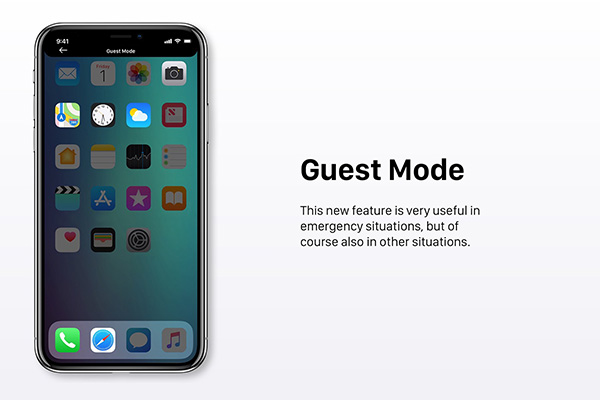
A new Guest Mode is particularly interesting to us, allowing an iPhone to be handed to another user with, presumably, limited access to applications and private data. Think of this as something that would be useful in emergencies, for example.
Interestingly, the concept also mentions a new App Bar that would be invoked via a swipe from the right side of the screen. Revealing favorite apps, this bar reminds us of a similar feature employed by Samsung on its own flagship devices, although it’s unclear whether that was the inspiration here.
There are, of course, other tidbits in this concept that we think could be great additions to iOS. Be sure to check out the full concept on iOS News And More on Behance if you want to get the lowdown.
(Source: iOS News And More [Behance])
Share:

iOS Tip: How to jump to the top of webpages, Twitter, Facebook, and apps with iPhone


We’re able to consume more and more content on our iPhones and it can be easy to find yourself deep in threads, webpages, social media, and other apps. If you haven’t made it a habit already, there’s a quick easy trick to return to the top of almost any app.

Tapping on the status bar (very top of the iPhone display) will jump you back to the top of your current app, webpage, or social feed. This shortcut works across almost all of Apple’s first-party apps as well as the majority of third-party apps, although there are a few exceptions. With that said, there are a couple of things to watch out for.

How to jump to the top of webpages, Twitter, Facebook, and apps on iPhone


  1. Tap on the status bar (top edge of your iPhone screen, pretty much on the notch on iPhone X). You can also tap on the status bar on the left or right ear of the iPhone X.
  2. Some apps like Safari may require a double tap, the first will expand url/menu bar, the second will return you to the top of the webpage. However most apps and social media like Twitter and Facebook only require one tap.
That’s all there is to it! Now, it’s just a matter of creating a habit to boost your efficiency.
Some apps like the third-party Twitter client Tweetbot even have a built in reverse function to jump back to where you were for accidentally status bar taps. Specifically in Tweetbot, you can tap the status bar a second time to return to what you were previously looking at.

Do you have any favorite apps that have taken this trick even further, like Tweetbot? Share them below in the comments!

Share:

How To Live Stream Oscars 2018 On Apple TV, iPhone, iPad, Or Mac

This coming Sunday, we will be treated to the biggest Hollywood ceremony of the year – the Oscars. Here’s how to live-stream the entire thing from red carpet to the final alcohol-fueled speech right on your Apple device, be that an iPhone, Mac, or Apple TV.
Getting the event on your big screen TV, assuming you own an Apple TV, of course, is to just go right ahead and download the ABC news app.
Here, you will find the full ceremony streamed right to your TV, allowing for the best experience for those who want to kick back with a drink and their sweet treat of choice – popcorn, we would suggest.

Any other device will require a trip to either ABCNews.com or Oscars.com, depending on your favorite. Both should work just fine, but at least if there are two to choose from, there are options should one fail to work for whatever reason. Remember folks, live-streaming is hard!


Beyond the app and the websites, Facebook will also be hosting a live-stream via, predictably enough, the ABC and Academy of Motion Picture Arts & Sciences Facebook pages. Again, “you pays your money and you takes your choice,” as the famous saying goes.
While the All Access show is free, you will unfortunately need ABC.com credentials if you want to watch the ceremony itself, of course.
So, will you be watching the 2018 Oscars this Sunday? If yes, who will you be rooting for to win this year on the big night? Sound off in the comments below!

Share:

Don’t fall for fake iTunes and App Store messages


Ever received an email that looks for all the world like it’s from Apple? Like, maybe a receipt from an iTunes purchase that you don’t remember making?

Well, that’s easy to fix, right? Just click on the link to update your account information and…
Ooops! Increasingly, chances are if you click, you wind up being phished.

Phishing scams that pose as official Apple emails are getting more and more sophisticated. On Tuesday, 9to5Mac reported on one recent version: phishing attacks posing as App Store subscription renewal messages.

On Friday, Apple posted a quick guide to help customers tell the difference between phishing emails and legitimate email from its App Store, iTunes Store, iBooks Store or Apple Music.

Apple says that scammy emails often resemble official Apple correspondence – same formatting, same language and same graphics. That includes, for example, the official apple-with-a-bite logo and/or that Apple Music pink and blue eighth note icon.

E-swindlers often try to trick us into sharing our personal or financial information by sending us messages or links to sites that look like they’re from Apple, but which in reality are out to steal our account information. From the iCompany’s post:

Some phishing emails will ask you to click on a link to update your account information. Others might look like a receipt for a purchase in the App Store, iTunes Store, iBooks Store or for Apple Music, that you’re certain you didn’t make.
“Never enter your account information on websites linked from” such messages, Apple said, and “never download or open attachments included within them.”
You might well ask OK, if I don’t click on that link, how can I correct what I know is a charge I didn’t make?

Easy, Apple says: if you get an email asking you to update your account or payment information, do it directly on your iOS device, under Settings, or do it in the Settings for the iTunes or App Store on your Mac, or in iTunes on a PC.

Ditto for requests to update your password: only do it in Settings on your device or at appleid.apple.com.

It’s great advice, and it echoes that handed out by Staysafeonline.org in the lead up to holiday shopping last year: Stop. Think. Connect.
Naked Security’s Paul Ducklin says you can try the logic on for size:
  • If these messages are true, you don’t need to click – you can just head over to Apple’s website manually, or open the App Store app yourself.
  • If the messages are not true, you don’t want to click, for obvious reasons.
  • Therefore, true or false, your best action is not to click.
Here are some other red flags that can indicate that a phisher is spoofing emails from Apple:
  • Requests for personal information, such as your taxpayer ID/Social Security Number, mother’s maiden name, full credit card number, or your credit card CCV code. Apple never asks for that information to be sent over email.
  • No billing address. Genuine purchase receipts – from purchases in the App Store, iTunes Store, iBooks Store, or Apple Music – include your current billing address, which Apple says scammers are unlikely to have. You can also review your App Store, iTunes Store, iBooks Store or Apple Music purchase history.
If you’re thinking, Uh-oh, I think I already fell for something, Apple asks that you report it to reportphishing@apple.com. If you’re on a Mac, forward the email as an attachment from the Message menu.

And if you think you might have entered personal information like a password or credit card info on a scam website, Apple says you should immediately change your Apple ID password.
Share:

Popular Posts

Labels